You may also be interested in...
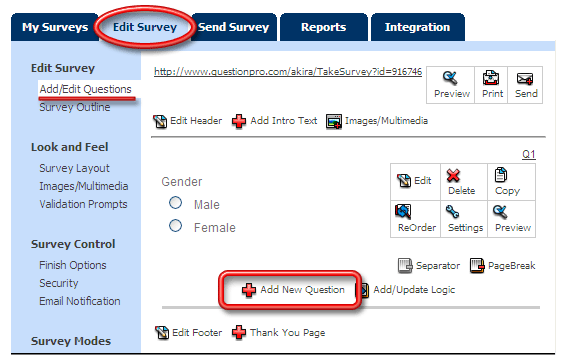
Under the Edit Survey tab click on the Add New Question link.
1. Screenshot
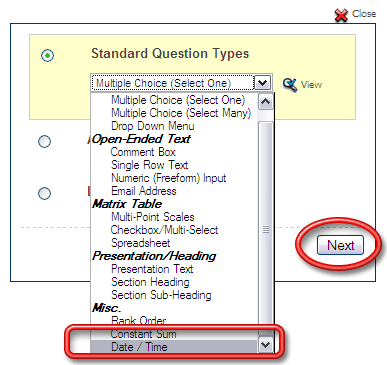
From the Standard Question Types select the Date / Time question. (You may need to Scroll to see this question type)
2. Screenshot
In the wizard enter the Question Text and Save the question.
Date/Time questions store the date/time information entered by respondents in a special format. This format enables tools to filter data based on the dates entered by respondents.
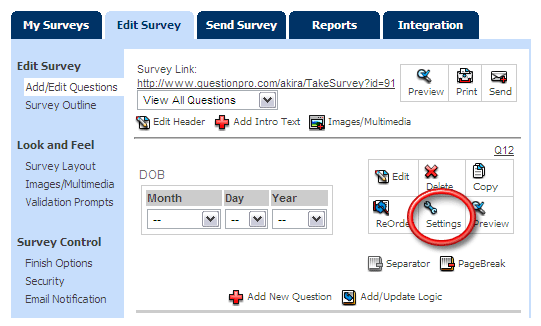
To customize the Date / Time question click on the Settings link for the question.
3. Screenshot
In the popup you can select from the given options.
4. Screenshot
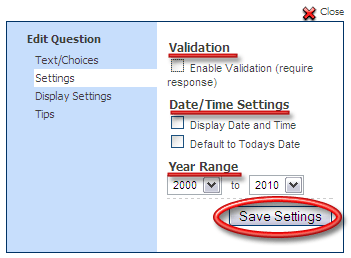
Validation/Response Required: Selecting this option will ensure that the date entered by respondent is valid.
Date and Time: Selecting this option will enable respondents to specify date and time as well. By default only date option is included.
Default to Todays Date: Selecting this option will set the date fields to the current date by default.
Year Range: By default the year range starts from 1900 to 2049. You can specify the required year range.